Selecting the right drafting approach is crucial to the success of any construction project. Builders, architects, and contractors across the United States often face the same question: 2D CAD vs 3D CAD, which option works best for construction needs? As technology evolves and project demands increase, understanding the difference between 2D and 3D CAD drawings becomes essential for making informed decisions.
Both methods remain widely used in the industry, but they serve different purposes. This guide explains how each drawing approach works, where it fits best, and how professional CAD drawing services in the USA help construction teams improve accuracy, coordination, and efficiency.
Understanding CAD Drawing in Construction
Computer-Aided Design drawings form the backbone of modern construction documentation. From early planning to final construction drawings, CAD drafting translates design intent into technical information that teams can build from.
CAD drawing for construction is used to create floor plans, elevations, sections, details, layouts, and coordination drawings that guide contractors on-site. Depending on project requirements, this can be done in two dimensions or three dimensions, each offering distinct advantages.
What is a 2D CAD Drawing?
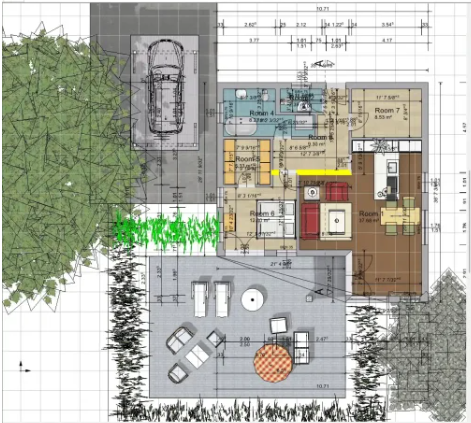
2D CAD drawing focuses on flat, two-dimensional drawings that represent length and width without depth. These drawings are commonly used for plans, sections, elevations, and construction details.
Where 2D CAD Drawing Is Commonly Used
- Floor plans and layouts
- Elevations and cross sections
- Construction details
- As-built documentation
For many projects, especially those with standard layouts, 2D CAD drawing services USA remain the most practical and cost-effective solution.
When to Use 2D CAD Drawing
Knowing when to use 2D CAD drawing helps avoid unnecessary modeling costs. It works best when:
- The project scope is straightforward
- Design coordination is minimal
- Budget control is a priority
- Speed and clarity matter more than visualization
Builders and contractors often rely on 2D drawings because they are quick to produce, easy to review, and universally accepted across jurisdictions.
What Is 3D CAD Drawing?
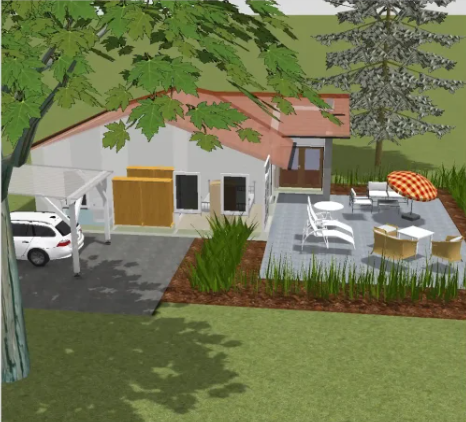
3D CAD drawing creates a three-dimensional digital model that includes depth, geometry, and spatial relationships. Unlike 2D drawings, 3D models allow users to visualize how components interact in real space.
Where 3D CAD Drawing Adds Value
- Complex building geometry
- Multi-trade coordination
- Visualization for clients and stakeholders
- Clash detection and design validation
- Construction sequencing support
With increasing project complexity, 3D CAD drawing services in the USA are widely used for commercial, industrial, and mixed-use developments.
Benefits of 3D CAD Drawing in Construction
The benefits of 3D CAD drawing in construction go beyond visuals:
- Improved coordination between trades
- Reduced clashes and rework
- Better understanding of spatial constraints
- Enhanced communication across teams
- Higher confidence before construction begins
For projects involving MEP systems, structural coordination, or tight construction tolerances, 3D drawings provide clarity that 2D drawings alone cannot deliver.
2D CAD vs 3D CAD: Key Differences
Understanding the difference between 2D and 3D CAD drawing helps teams choose the right approach at the right time.
Visualization and Clarity
2D CAD provides clear technical documentation but relies on interpretation.
3D CAD offers realistic visualization, helping teams see how elements fit together.
Accuracy and Coordination
2D drawings work well for isolated systems.
3D models excel when multiple systems must be coordinated within a limited space.
Speed and Cost
2D drawing is faster and more affordable for basic documentation.
3D drawing takes more time but reduces costly construction-stage errors.
Project Stage Suitability
2D CAD is ideal for early design, permits, and standard construction documents.
3D CAD supports detailed design, coordination, and construction planning.
This balance is why many firms use both methods together rather than choosing only one.
2D vs 3D CAD Drawing Cost Comparison
Cost plays a major role in drawing decisions. A 2D vs 3D CAD drawing cost comparison typically shows:
- 2D CAD drawing has lower upfront costs and faster turnaround
- 3D CAD drawing requires a higher initial investment, but reduces downstream risks
While 3D drawing may seem more expensive initially, it often saves money by minimizing clashes, change orders, and on-site delays. For complex projects, the long-term value of 3D modeling can outweigh the added drawing cost.
Which Option Works Best for Builders and Contractors?
For CAD drawing for builders and contractors, the right choice depends on how drawings will be used in the field.
Builders often prefer 2D drawings for:
- Clear measurements
- Straightforward execution
- Faster approvals
Contractors working on complex builds benefit from 3D drawings because it:
- Improves installation accuracy
- Supports trade coordination
- Reduces RFIs and rework
In many cases, a hybrid workflow using 2D drawings supported by 3D models offers the best results.
Architectural Use Cases in the USA
For firms providing architectural CAD drawing USA, the choice between 2D and 3D often aligns with project type.
Residential and small commercial projects rely heavily on 2D drawings for permits and construction. Large commercial developments, healthcare facilities, and industrial buildings increasingly use 3D drawings to manage complexity and client expectations.
Local regulations, client requirements, and project budgets across the USA also influence which drawing approach is selected.
How to Choose the Right CAD Drawing Approach
When deciding between 2D CAD vs 3D CAD, consider these questions:
- How complex is the project geometry?
- Are multiple systems being coordinated?
- Is visualization important for stakeholders?
- What level of accuracy is required before construction?
- What is the available drafting budget?
Projects do not always require full 3D modeling. However, ignoring 3D drafting when coordination is critical can lead to avoidable issues later.
The Role of Professional CAD Support
Whether you need simple layouts or highly detailed coordination models, working with experienced professionals ensures your drawings meet industry standards and align with real construction requirements. Reliable CAD drafting services in the USA help architects, engineers, builders, and contractors manage workload efficiently while maintaining accuracy, consistency, and speed across projects.
At CAD Drawing Services US, we support construction teams with dedicated CAD experts backed by 29+ years of group experience. Our team understands construction workflows, drafting standards, and on-site challenges, which allows us to deliver scalable CAD solutions tailored to each project’s scope and timeline. If your team is evaluating the right drawing approach for upcoming projects, we can help you implement the most efficient CAD strategy without unnecessary overhead or complexity.
FAQs
The main difference is dimensional representation. 2D CAD uses flat drawings, while 3D CAD creates spatial models that show depth and relationships between components.
No. 3D CAD is better for complex and coordinated projects, while 2D CAD is often sufficient for straightforward construction documentation.
Contractors should use 3D drawings when projects involve multiple trades, tight spaces, or high coordination requirements.
Yes. 2D CAD drawing remains widely used across the USA for permits, construction drawings, and as-built documentation.
Professional CAD drawing services provide accurate drawings, improve coordination, and help teams meet construction standards efficiently.